
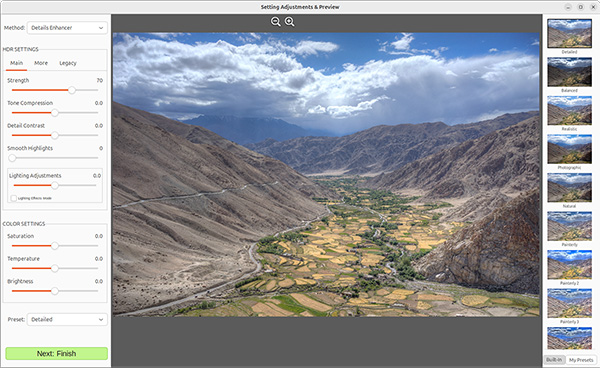
Turn any high contrast scene into a stunning HDR image.
|
|
"Photomatix gives you the power to take control of your processing, with ease, efficiency and consistency."
While there are different products out there, nothing has been able to produce the same consistent, beautiful photos as can be made using Photomatix.
Our workflow, using Photomatix, allows us to process 100 photos in less than an hour with complete color and lighting accuracy. No need to pay foreign editors, you can do it all yourself with ease, saving you money and headache.
I have multiple real estate photography business in multiple cities and taught hundreds of real estate photographers from all over the world, and none of this could have been possible without Photomatix. "

Rob Moroto
Real estate photography instructor
Try for free, no registration required.
The trial adds a watermark to the final image. A license is a US$49 one-time purchase.
Ubuntu & Linux Mint (Ubuntu 23.04 / 24.04)
1) Download Photomatix for Linux v3
2) Click on the .deb package you downloaded and click "Software Install" on the installer's window.
3) To run it once installed, look for its icon (a penguin with an umbrella) in the list of installed applications.
Flatpak
1) Open a terminal window.
2) To install Photomatix, use the command:
sudo flatpak install https://www.hdrsoft.com/download/linux/com.hdrsoft.PhotomatixLinux.flatpakref
3) To run it, use:
flatpak run com.hdrsoft.PhotomatixLinux
Ubuntu
Installing via the command-line, or if the quick install instructions don't work:
1) Open a terminal window.
2) If you have gdebi installed, use the command:
sudo gdebi /path/to/downloaded-file.deb
Otherwise, use:
sudo dpkg -i /path/to/downloaded-file.deb
If you get errors about unresolved dependencies:
Open a terminal window and enter:
sudo apt-get install -f
If you are running on an older Ubuntu or Linux Mint version
Download the previous version of Photomatix for Linux, using the download links below:
Photomatix for Linux v2 (Ubuntu 20.04 LTS & 22.04 / Linux Mint 20)
Photomatix for Linux v2 (Ubuntu 18.04 LTS)
Flatpak
If you get errors about the flatpak command not being found:
Try installing it using your package manager with a command such as:
sudo apt install flatpak
or
sudo dnf install flatpak
The HDR process starts with taking multiple exposures. Learn how to set Exposure Bracketing (AEB) on various camera models.
How long does the trial last?
You can try Photomatix for Linux for as long as you want. The trial doesn't expire.
When you use Photomatix for Linux in trial mode, a watermark is added to the created image. If you purchase a Photomatix for Linux license, you will receive a license key that registers the software and disables the watermark.
Does using Photomatix for Linux require a subscription?
No. Photomatix for Linux isn't offered as a subscription.
A license of Photomatix for Linux is a perpetual license. You buy the license once and own it forever.
Will I receive free updates?
Yes. A license for version 3 of Photomatix for Linux allows you to get all updates made to version 3 for free. If you purchased a license for Photomatix for Linux version 2, you can upgrade to version 3 free of charge.
You can upgrade to a new version or sub-version by installing the latest release of Photomatix for Linux using the instructions above.
I have a Photomatix Pro license. Is it valid for Photomatix for Linux?
Photomatix Pro is available for both Windows and Mac, but not for Linux at the moment. Photomatix for Linux is a product separate from Photomatix Pro, and therefore requires a different license.
However, we are making an exception in two cases. You are eligible for a free Photomatix for Linux license if:
If you are in one of these two cases, please contact the Photomatix support team.
How do the Photomatix for Linux features compare to Photomatix Pro?
Check the Photomatix for Linux comparison page to compare its features and pricing with Photomatix Pro and Photomatix Essentials.
Are there sample bracketed exposures I can use to try your software?
Yes. Check the bracketed photo samples page if you would like to test Photomatix for Linux before you've taken any bracketed photos.
Is there an update log for Photomatix for Linux?
You can view the Photomatix for Linux version history on this page:
I have some questions about Photomatix for Linux, how can I get in touch with your support team?
Please email us at support@hdrsoft.com or use our contact form.
The Photomatix Support Team is always happy to help and reply to your questions.
User Manual Photomatix for Linux
For tutorials and tips, check our Learning Center.